Blog

  • Les clubs étudiants WordPress créent une dynamique

    Les clubs étudiants WordPress créent une dynamique

    Les clubs d’étudiants WordPress commencent à prendre forme comme une nouvelle façon de poursuivre l’élan de WordPress Campus Connect au-delà des ateliers ponctuels. Ce qui commence comme une introduction à WordPress et à l’open source se poursuit désormais sur le campus à travers des groupes dirigés par des étudiants qui créent un espace d’apprentissage, de soutien par les pairs et de participation communautaire précoce. Ce changement est important car il offre aux étudiants un chemin plus cohérent vers l’écosystème WordPress tout en aidant les communautés locales à établir des liens plus solides avec la prochaine génération de contributeurs.

    Des étudiants présentant un site Web qu’ils ont créé lors d’une session de club

    Lorsque les ateliers WordPress Campus Connect ont commencé à atteindre les universités, l’objectif était simple : aider les étudiants à découvrir WordPress, à comprendre la valeur de l’open source et à voir que la contribution peut faire partie de leur parcours d’apprentissage. Dans de nombreux cas, cette première introduction a suscité un intérêt immédiat. Les étudiants qui n’avaient jamais travaillé avec WordPress auparavant ont commencé à poser des questions, à explorer ce que le logiciel pouvait faire et à faire preuve de curiosité à l’égard de la communauté au sens large.

    Cette première réponse a également révélé une lacune. Un atelier peut susciter l’intérêt, mais il ne peut pas toujours le maintenir à lui seul. Encourager les étudiants à assister à des rencontres WordPress locales a permis de prolonger cette première connexion et, dans certains cas, a apporté une nouvelle énergie aux communautés locales existantes. Malgré cela, il est devenu évident que les campus avaient besoin de quelque chose de plus cohérent et plus proche de l’environnement quotidien des étudiants.

    Les

    Les clubs étudiants WordPress sont nés de ce besoin. Au lieu de limiter leur engagement à un seul événement, ces clubs créent une présence continue dirigée par les étudiants sur le campus, où les étudiants peuvent continuer à apprendre, partager leurs connaissances avec leurs pairs et gagner en confiance au fil du temps. Ils offrent également un pont pratique entre une première exposition et une participation plus profonde, aidant les étudiants à passer de la curiosité à la contribution grâce à des activités régulières et au soutien de la communauté.

    Apprendre ce qui soutient la participation

    Lorsque les clubs d’étudiants WordPress ont commencé à se former sur les campus, l’enthousiasme initial était encourageant, mais maintenir cet élan s’est avéré être l’un des premiers véritables défis. Les organisateurs des clubs étudiants ont partagé que l’intérêt était souvent plus fort au début, surtout après un atelier ou une séance d’introduction, mais que transformer cet intérêt en participation régulière exigeait de la patience et de l’expérimentation. Comme c’est le cas pour de nombreux efforts communautaires, les clubs ont eu besoin de temps pour trouver un rythme qui convienne aux étudiants concernés.

    L’un des défis les plus courants était la cohérence. De nombreux étudiants étaient intéressés par l’apprentissage de WordPress, mais leur engagement régulier ne dépendait pas seulement de leur curiosité initiale. Les organisateurs ont constaté que la participation augmentait plus régulièrement lorsque les activités semblaient accessibles et utiles, en particulier lorsque les étudiants pouvaient apprendre par la pratique plutôt que par l’écoute. De petites séances d’apprentissage, des exercices collaboratifs et des activités pratiques ont souvent permis aux étudiants de revenir plus facilement et de participer à nouveau.

    Les organisateurs ont également remarqué que certains étudiants hésitaient au départ à s’engager activement. Poser des questions, prendre la parole dans un groupe ou se porter volontaire pour aider à diriger une session ne s’est pas toujours fait naturellement. Construire un club signifiait créer un environnement dans lequel les étudiants se sentaient suffisamment à l’aise pour participer, essayer quelque chose de nouveau et s’approprier progressivement leur propre apprentissage.

    Les horaires académiques ajoutaient un autre niveau de complexité. Étant donné que les clubs sont dirigés par des étudiants, la planification des cours, des devoirs et des examens exigeait de la flexibilité. Maintenir des activités régulières sans surcharger les organisateurs ou les participants signifiait travailler selon les rythmes de la vie du campus. Ces premières difficultés sont devenues une partie du processus d’apprentissage et ont contribué à façonner la façon dont les clubs ont commencé à fonctionner plus efficacement.

    Construire grâce à de petites activités cohérentes

    Au fur et à mesure que les organisateurs relevaient ces défis, certaines approches ont commencé à donner des résultats. Au lieu de se concentrer sur de grands événements, de nombreux clubs ont trouvé leur élan grâce à des activités simples et reproductibles auxquelles les étudiants pouvaient participer sans se sentir intimidés. Des sessions d’apprentissage régulières, de petits ateliers pratiques et des discussions entre pairs ont contribué à créer un environnement à la fois accueillant et pratique.

    Une activité d’un club étudiant dans un collège dirigée par un organisateur du club étudiant
    Étudiants présentant des sites Web créés lors d’une session de club

    Cette approche constante était importante. Lorsque les étudiants ont pu revenir à des formats familiers et constater leurs progrès d’une session à l’autre, les clubs sont devenus plus faciles à maintenir. Les organisateurs ont pu créer des routines et les participants pouvaient participer à leur propre rythme. Au fil du temps, ces petits efforts ont commencé à renforcer la participation plus efficacement que les grands événements occasionnels.

    La propriété étudiante a également joué un rôle important. À mesure que les étudiants ont commencé à partager ce qu’ils avaient appris, à aider leurs pairs et à participer à des séances d’animation, l’engagement a commencé à se développer de manière plus organique. Ces moments ont contribué à faire passer les clubs du simple statut d’espaces d’apprentissage à celui de communautés à part entière. Les étudiants n’utilisaient pas WordPress uniquement dans un contexte de classe. Ils commençaient également à le comprendre comme faisant partie d’un projet open source collaboratif façonné par des personnes qui apprennent ensemble, construisent ensemble et se soutiennent mutuellement.

    Les conseils de la communauté WordPress locale ont contribué à renforcer ces progrès. Bien que les clubs soient dirigés par des étudiants, les organisateurs ont bénéficié de la disponibilité de membres expérimentés de la communauté en tant que mentors. Les mentors les ont aidés à réfléchir à la structure des séances, à la planification des activités et au défi pratique de rester motivé tout en équilibrant les responsabilités académiques. Ce type de soutien a donné aux organisateurs plus de confiance pour expérimenter et continuer à construire.

    Le mentorat a également permis de relier l’activité du campus à l’écosystème WordPress plus large. Les étudiants n’apprenaient pas de manière isolée. Grâce aux conseils de la communauté locale, ils ont pu voir comment les rencontres, les contributions et la collaboration s’intègrent dans un réseau plus large de personnes qui participent à WordPress depuis des années. Ce lien a donné plus de sens au travail effectué sur le campus et a aidé les étudiants à voir plus clairement la voie à suivre.

    Impact précoce sur les campus

    Bien que les clubs d’étudiants WordPress en soient encore à leurs débuts, des signes d’impact sont déjà visibles. Les organisateurs ont indiqué que de plus en plus d’étudiants s’intéressent à l’apprentissage de WordPress et à l’exploration de ce à quoi peut ressembler la participation open source dans la pratique. Dans plusieurs cas, les étudiants qui ont d’abord rejoint le club en tant qu’apprenants contribuent désormais aux discussions, aident leurs pairs pendant les sessions et organisent eux-mêmes les activités du club.

    Ce passage d’une participation passive à une participation active est l’un des signes les plus clairs de croissance. Cela suggère que les clubs commencent à créer plus que de la sensibilisation. Ils créent des opportunités permettant aux étudiants de renforcer leur confiance, de pratiquer le leadership et de développer un sentiment de connexion plus fort avec la communauté WordPress. Même à ce stade, ce type de changement souligne la valeur à long terme d’un engagement durable sur le campus.

    Un exemple encourageant est venu lors de la célébration de la Journée internationale de la femme à Ajmer, en Inde, où les étudiants ont participé aux côtés des membres de la communauté WordPress locale. Les organisateurs ont noté que l’événement comptait 100 participantes féminines, dont environ 50 % provenaient de clubs étudiants. Pour beaucoup de ces étudiants, il s’agissait d’une première opportunité de participer à un événement communautaire plus large, de rencontrer d’autres contributeurs et de voir comment les communautés open source collaborent en pratique.

    Événement de la Journée de la femme Ajmer 2026, avec plus de 50 % de participation des clubs étudiants

    Des expériences comme celle-là montrent comment les initiatives menées par les étudiants peuvent s’étendre au-delà du campus et commencer à contribuer à la communauté au sens large. Ils créent également un espace permettant à de nouvelles voix de participer. À mesure que les étudiants passent des sessions de club aux événements locaux, ils acquièrent de l’expérience non seulement en tant qu’apprenants, mais également en tant que membres de la communauté qui peuvent contribuer à façonner la suite.

    Les clubs créent également des opportunités de leadership sur le campus. Les organisateurs ont assumé de nouveaux rôles en coordonnant les activités, en encourageant la participation et en maintenant l’élan au fil du temps. Ces expériences aident les étudiants à acquérir des compétences importantes à la fois au sein de la communauté WordPress et au-delà, notamment en communication, en organisation et en résolution de problèmes.

    « Être organisateur d’un club étudiant m’a aidé à améliorer mes compétences en leadership et en communication. »
    — Sanjeevni Kumari, organisateur du club étudiant WordPress, Mahila Engineering College, Ajmer

    Regard vers l’avenir

    Les clubs d’étudiants WordPress sont encore en développement, mais le parcours jusqu’à présent indique une direction prometteuse. Ce qui a commencé comme un effort pour maintenir l’intérêt après WordPress Campus Connect devient progressivement un modèle plus durable d’apprentissage continu et de collaboration sur le campus. Les clubs aident les étudiants à rester connectés à WordPress au-delà d’une première introduction, tout en créant des liens plus solides entre les espaces éducatifs et les communautés locales.

    Ce potentiel à plus long terme est l’une des raisons pour lesquelles ce travail est important. Grâce à des activités régulières sur le campus et à un mentorat continu, les clubs étudiants peuvent contribuer à créer une base plus solide pour les futurs contributeurs. Ils peuvent également aider les étudiants à prendre confiance en eux avant d’assister à des rencontres locales, de contribuer aux efforts communautaires ou de participer à des événements en dehors de leur campus.

    « Avec des activités régulières sur le campus via les clubs étudiants WordPress, l’impact réel pourrait devenir visible au cours des deux prochaines années, à mesure qu’un écosystème WordPress plus fort commence à prendre forme au sein des campus. »
    — Anand Upadhyay, mentor du club étudiant

    À mesure que de plus en plus d’étudiants s’impliquent et s’approprient ces espaces, les clubs étudiants WordPress peuvent continuer à ouvrir des voies vers l’apprentissage, le leadership et la participation communautaire. Pour les campus, ils offrent un moyen de maintenir l’élan après Campus Connect. Pour le projet plus large, ils représentent une autre étape vers l’accueil d’un plus grand nombre d’étudiants dans l’écosystème open source WordPress. Pour suivre ce travail et découvrir comment il se connecte à la communauté au sens large, les lecteurs peuvent consulter les WordPress Campus Connect, les WordPress Meetups et d’autres initiatives éducatives et communautaires sur WordPress.org.

    Remarque : Une grande partie du mérite appartient à @webtechpooja (Pooja Derashri) pour son aide dans la rédaction de cet article.

    Aller à la source originale

  • WordPress-Studentenclubs sorgen für Dynamik

    WordPress-Studentenclubs sorgen für Dynamik

    WordPress-Studentenclubs nehmen Gestalt an und bieten eine neue Möglichkeit, die Dynamik von WordPress Campus Connect über einmalige Workshops hinaus weiterzuführen. Was als Einführung in WordPress und Open Source beginnt, wird nun auf dem Campus durch von Studenten geleitete Gruppen fortgesetzt, die Raum für Lernen, Unterstützung durch Gleichaltrige und frühe Beteiligung an der Gemeinschaft schaffen. Dieser Wandel ist wichtig, weil er Schülern einen konsistenteren Einstieg in das WordPress-Ökosystem ermöglicht und gleichzeitig lokalen Gemeinschaften hilft, stärkere Verbindungen mit der nächsten Generation von Mitwirkenden aufzubauen.

    Studenten Präsentation einer Website, die sie während einer Clubsitzung erstellt haben

    Als die WordPress Campus Connect-Workshops zum ersten Mal die Universitäten erreichten, war das Ziel klar: Den Studierenden dabei zu helfen, WordPress zu entdecken, den Wert von Open Source zu verstehen und zu erkennen, dass ein Beitrag Teil ihrer Lernreise sein kann. In vielen Fällen weckte diese erste Einführung sofort Interesse. Studenten, die noch nie zuvor mit WordPress gearbeitet hatten, begannen, Fragen zu stellen, die Möglichkeiten der Software zu erkunden und ihre Neugier auf die breitere Community zu zeigen.

    Diese frühe Antwort offenbarte auch eine Lücke. Ein Workshop könnte zwar Interesse wecken, es allein aber nicht immer aufrechterhalten. Die Ermutigung der Schüler, an lokalen WordPress-Treffen teilzunehmen, trug dazu bei, diese erste Verbindung zu vertiefen und in einigen Fällen neue Energie in bestehende lokale Gemeinschaften zu bringen. Dennoch wurde klar, dass die Universitäten etwas Konsistenteres und näher an der Alltagsumgebung der Studierenden benötigen.

    WordPress Student Clubs sind aus diesem Bedürfnis heraus entstanden. Anstatt das Engagement auf eine einzige Veranstaltung zu beschränken, schaffen diese Clubs eine kontinuierliche, von Studenten geleitete Präsenz auf dem Campus, wo Studenten weiter lernen, Wissen mit Kollegen teilen und mit der Zeit selbstbewusster werden können. Sie bieten auch eine praktische Brücke zwischen dem ersten Kontakt und einer tieferen Beteiligung und helfen den Schülern, durch regelmäßige Aktivitäten und Unterstützung durch die Gemeinschaft von der Neugier zum Beitrag zu gelangen.

    Lernen, was die Teilnahme nachhaltig macht

    Als sich an allen Campusstandorten WordPress-Studentenclubs zu bilden begannen, war die anfängliche Begeisterung ermutigend, aber diese Dynamik aufrechtzuerhalten erwies sich als eine der ersten echten Herausforderungen. Die Organisatoren von Studentenclubs teilten mit, dass das Interesse häufig am Anfang am stärksten sei, insbesondere nach einem Workshop oder einer Einführungssitzung. Um dieses Interesse jedoch in eine regelmäßige Teilnahme umzuwandeln, seien Geduld und Experimentierfreudigkeit erforderlich. Wie viele Gemeinschaftsinitiativen brauchten die Clubs Zeit, um einen Rhythmus zu finden, der für die beteiligten Schüler funktionierte.

    Eine der häufigsten Herausforderungen war die Konsistenz. Viele Studenten waren daran interessiert, WordPress zu lernen, aber regelmäßiges Engagement hing von mehr als nur anfänglicher Neugier ab. Die Organisatoren stellten fest, dass die Beteiligung stetig zunahm, wenn sich die Aktivitäten zugänglich und nützlich anfühlten, insbesondere wenn die Schüler durch Handeln und nicht nur durch Zuhören lernen konnten. Kleine Lerneinheiten, gemeinsame Übungen und praktische Aktivitäten machten es den Schülern oft leichter, zurückzukommen und erneut teilzunehmen.

    Die Organisatoren stellten außerdem fest, dass einige Schüler zunächst zögerten, sich aktiv zu engagieren. Es war nicht immer selbstverständlich, Fragen zu stellen, sich in einer Gruppe zu äußern oder ehrenamtlich bei der Leitung einer Sitzung mitzuhelfen. Der Aufbau eines Clubs bedeutete, ein Umfeld zu schaffen, in dem sich die Schüler wohl genug fühlten, um mitzumachen, etwas Neues auszuprobieren und nach und nach die Verantwortung für ihr eigenes Lernen zu übernehmen.

    Akademische Stundenpläne fügten eine weitere Ebene der Komplexität hinzu. Da die Clubs von Studenten geleitet werden, war bei der Planung von Kursen, Aufgaben und Prüfungen Flexibilität erforderlich. Um die Aktivitäten regelmäßig aufrechtzuerhalten, ohne Organisatoren oder Teilnehmer zu überfordern, musste man sich an den Rhythmus des Campuslebens halten. Diese frühen Schwierigkeiten wurden Teil des Lernprozesses und trugen dazu bei, dass die Clubs begannen, effektiver zu arbeiten.

    Aufbau durch kleine, konsistente Aktivitäten

    Während die Organisatoren diese Herausforderungen bewältigten, zeigten bestimmte Ansätze erste Ergebnisse. Anstatt sich auf Großveranstaltungen zu konzentrieren, fanden viele Clubs durch einfache, wiederholbare Aktivitäten, an denen die Schüler teilnehmen konnten, ohne sich eingeschüchtert zu fühlen, Schwung. Regelmäßige Lernsitzungen, kleine praktische Workshops und Peer-to-Peer-Diskussionen trugen dazu bei, eine Umgebung zu schaffen, die sowohl einladend als auch praktisch war.

    Eine Studentenclub-Aktivität in einer Hochschule, die von einem Studentenclub-Organisator geleitet wird
    Studenten Präsentation von Websites, die während einer Clubsitzung erstellt wurden

    Diese konsequente Vorgehensweise war wichtig. Wenn die Schüler zu vertrauten Formaten zurückkehren und von einer Sitzung zur nächsten Fortschritte sehen konnten, wurde es einfacher, Clubs aufrechtzuerhalten. Die Organisatoren konnten Routinen erstellen und die Teilnehmer konnten in ihrem eigenen Tempo teilnehmen. Im Laufe der Zeit führten diese kleinen Bemühungen zu einer wirksameren Stärkung der Beteiligung als gelegentliche Großveranstaltungen.

    Die Eigenverantwortung der Studierenden spielte ebenfalls eine wichtige Rolle. Als die Schüler begannen, das Gelernte weiterzugeben, ihren Mitschülern zu helfen und an Laufsitzungen teilzunehmen, begann das Engagement organischer zu wachsen. Diese Momente trugen dazu bei, dass sich die Clubs von reinen Lernorten zu eigenständigen Gemeinschaften entwickelten. Die Schüler verwendeten WordPress nicht nur im Unterrichtskontext. Sie begannen es auch als Teil eines gemeinschaftlichen Open-Source-Projekts zu verstehen, das von Menschen geprägt wurde, die gemeinsam lernen, gemeinsam aufbauen und sich gegenseitig unterstützen.

    Die Anleitung der lokalen WordPress-Community hat dazu beigetragen, diesen Fortschritt zu verstärken. Obwohl die Clubs von Studenten geleitet werden, profitierten die Organisatoren davon, dass erfahrene Community-Mitglieder als Mentoren zur Verfügung standen. Mentoren halfen ihnen, die Sitzungsstruktur, die Aktivitätsplanung und die praktische Herausforderung, motiviert zu bleiben und gleichzeitig akademische Verantwortung unter einen Hut zu bringen, zu überdenken. Diese Art der Unterstützung gab den Organisatoren mehr Selbstvertrauen, um zu experimentieren und weiterzumachen.

    Mentoring verband auch die Campus-Aktivitäten mit dem breiteren WordPress-Ökosystem. Die Schüler lernten nicht isoliert. Durch die Anleitung der lokalen Community konnten sie sehen, wie Meetups, Beiträge und Zusammenarbeit in ein größeres Netzwerk von Menschen passen, die seit Jahren an WordPress teilnehmen. Diese Verbindung verlieh der Arbeit auf dem Campus mehr Bedeutung und half den Studierenden, einen klareren Weg nach vorne zu erkennen.

    Frühzeitige Auswirkungen auf den gesamten Campus

    Obwohl WordPress-Studentenclubs sich noch in einem frühen Stadium befinden, sind bereits Anzeichen von Auswirkungen erkennbar. Die Organisatoren haben mitgeteilt, dass immer mehr Studenten Interesse daran zeigen, WordPress zu lernen und zu erkunden, wie die Teilnahme an Open Source in der Praxis aussehen kann. In mehreren Fällen beteiligen sich Schüler, die zunächst als Lernende beigetreten sind, nun an Diskussionen, helfen Gleichaltrigen während der Sitzungen und organisieren selbst Clubaktivitäten.

    Dieser Wandel von der passiven Beteiligung zur aktiven Beteiligung ist eines der deutlichsten Anzeichen für Wachstum. Es deutet darauf hin, dass die Clubs beginnen, mehr als nur Bewusstsein zu schaffen. Sie bieten den Schülern die Möglichkeit, Selbstvertrauen aufzubauen, Führungsqualitäten zu üben und ein stärkeres Gefühl der Verbindung zur WordPress-Community zu entwickeln. Selbst in diesem Stadium verdeutlicht diese Art von Veränderung den langfristigen Wert eines anhaltenden Engagements auf dem Campus.

    Ein ermutigendes Beispiel kam während der Feierlichkeiten zum Internationalen Frauentag in Ajmer, Indien, wo Schülerinnen und Schüler gemeinsam mit Mitgliedern der lokalen WordPress-Community teilnahmen. Die Organisatoren gaben an, dass an der Veranstaltung 100 weibliche Teilnehmer teilnahmen, wobei rund 50 % der Teilnehmer aus Studentenclubs stammten. Für viele dieser Studenten war es die erste Gelegenheit, an einer größeren Community-Veranstaltung teilzunehmen, andere Mitwirkende zu treffen und zu sehen, wie Open-Source-Communitys in der Praxis zusammenarbeiten.

    Veranstaltung zum Frauentag in Ajmer 2026, an der mehr als 50 % Studentenclubs teilnehmen

    Erfahrungen wie diese zeigen, wie studentische Initiativen über den Campus hinausgehen und einen Beitrag zur breiteren Gemeinschaft leisten können. Sie schaffen auch Raum für die Beteiligung neuer Stimmen. Wenn Schüler von Clubsitzungen zu lokalen Veranstaltungen übergehen, sammeln sie nicht nur Erfahrungen als Lernende, sondern auch als Community-Mitglieder, die mitgestalten können, was als nächstes kommt.

    Die Clubs schaffen auch Führungsmöglichkeiten auf dem Campus. Die Organisatoren haben neue Rollen übernommen, indem sie Aktivitäten koordiniert, zur Teilnahme ermutigt und die Dynamik im Laufe der Zeit aufrechterhalten haben. Diese Erfahrungen helfen den Schülern, Fähigkeiten zu entwickeln, die sowohl innerhalb der WordPress-Community als auch darüber hinaus von Bedeutung sind, einschließlich Kommunikation, Organisation und Problemlösung.

    „Die Tätigkeit als Organisator eines Studentenclubs hat mir geholfen, meine Führungs- und Kommunikationsfähigkeiten zu verbessern.“
    – Sanjeevni Kumari, Organisator des WordPress-Studentenclubs, Mahila Engineering College, Ajmer

    Blick nach vorn

    WordPress-Studentenclubs befinden sich noch in der Entwicklung, aber der bisherige Weg weist in eine vielversprechende Richtung. Was als Versuch begann, das Interesse nach WordPress Campus Connect aufrechtzuerhalten, entwickelt sich nach und nach zu einem dauerhafteren Modell für kontinuierliches Lernen und Zusammenarbeit auf dem Campus. Die Clubs helfen Schülern, über die erste Einführung hinaus mit WordPress in Verbindung zu bleiben, und schaffen gleichzeitig stärkere Verbindungen zwischen Bildungsräumen und lokalen Gemeinschaften.

    Dieses längerfristige Potenzial ist einer der Gründe, warum diese Arbeit wichtig ist. Durch regelmäßige Aktivitäten auf dem Campus und kontinuierliche Betreuung können Studentenclubs dazu beitragen, eine stärkere Grundlage für zukünftige Mitwirkende zu schaffen. Sie können Schülern auch dabei helfen, Selbstvertrauen aufzubauen, bevor sie lokale Treffen besuchen, sich an gemeinnützigen Aktivitäten beteiligen oder an Veranstaltungen außerhalb ihres Campus teilnehmen.

    „Mit regelmäßigen Aktivitäten auf dem Campus durch WordPress-Studentenclubs können die tatsächlichen Auswirkungen in den nächsten Jahren sichtbar werden, wenn auf dem Campus ein stärkeres WordPress-Ökosystem Gestalt annimmt.“
    – Anand Upadhyay, Mentor des Studentenclubs

    Je mehr Studenten sich engagieren und die Verantwortung für diese Räume übernehmen, desto mehr können WordPress-Studentenclubs weiterhin Wege zum Lernen, zur Führung und zur Beteiligung an der Gemeinschaft eröffnen. Für Campusse bieten sie eine Möglichkeit, die Dynamik nach Campus Connect aufrechtzuerhalten. Für das umfassendere Projekt stellen sie einen weiteren Schritt dar, um mehr Studenten im WordPress-Open-Source-Ökosystem willkommen zu heißen. Um diese Arbeit zu verfolgen und herauszufinden, wie sie sich mit der breiteren Community verbindet, können Leser sich WordPress Campus Connect, WordPress Meetups und andere Bildungs- und Community-Initiativen auf WordPress.org ansehen.

    Hinweis: Ein Großteil des Danks geht an @webtechpooja (Pooja Derashri) für die Hilfe beim Schreiben dieses Artikels.

    Zur Originalquelle gehen

  • WordPress Student Clubs Build Momentum

    WordPress Student Clubs Build Momentum

    WordPress Student Clubs are beginning to take shape as a new way to carry the momentum of WordPress Campus Connect beyond one-time workshops. What starts as an introduction to WordPress and open source is now continuing on campus through student-led groups that create space for learning, peer support, and early community participation. That shift matters because it gives students a more consistent path into the WordPress ecosystem while helping local communities build stronger connections with the next generation of contributors.

    Students showcasing a website they built during a club session

    When WordPress Campus Connect workshops first began reaching universities, the goal was straightforward: help students discover WordPress, understand the value of open source, and see that contribution can be part of their learning journey. In many cases, that first introduction created immediate interest. Students who had never worked with WordPress before started asking questions, exploring what the software could do, and showing curiosity about the wider community.

    That early response also revealed a gap. A workshop could spark interest, but it could not always sustain it on its own. Encouraging students to attend local WordPress meetups helped extend that first connection and, in some cases, brought new energy to existing local communities. Even so, it became clear that campuses needed something more consistent and closer to students’ everyday environment.

    WordPress Student Clubs emerged from that need. Instead of limiting engagement to a single event, these clubs create an ongoing, student-led presence on campus where students can keep learning, share knowledge with peers, and grow more confident over time. They also offer a practical bridge between first exposure and deeper participation, helping students move from curiosity to contribution through regular activity and community support.

    Learning What Sustains Participation

    As WordPress Student Clubs started forming across campuses, the early enthusiasm was encouraging, but sustaining that momentum proved to be one of the first real challenges. Student Club Organizers shared that interest was often strongest at the beginning, especially after a workshop or an introductory session, but turning that interest into regular participation required patience and experimentation. Like many community efforts, the clubs needed time to find a rhythm that worked for the students involved.

    One of the most common challenges was consistency. Many students were interested in learning WordPress, but regular engagement depended on more than initial curiosity. Organizers found that participation grew more steadily when activities felt approachable and useful, especially when students could learn by doing rather than only listening. Small learning sessions, collaborative exercises, and hands-on activities often made it easier for students to return and take part again.

    Organizers also noticed that some students were initially hesitant to engage actively. Asking questions, speaking up in a group, or volunteering to help lead a session did not always happen naturally. Building a club meant creating an environment where students felt comfortable enough to participate, try something new, and gradually take ownership of their own learning.

    Academic schedules added another layer of complexity. Because the clubs are student-led, planning around classes, assignments, and exams required flexibility. Keeping activities regular without overwhelming organizers or participants meant working within the rhythms of campus life. Those early difficulties became part of the learning process and helped shape how the clubs began to operate more effectively.

    Building Through Small, Consistent Activities

    As organizers worked through those challenges, certain approaches began to show results. Instead of focusing on large events, many clubs found momentum through simple, repeatable activities that students could join without feeling intimidated. Regular learning sessions, small hands-on workshops, and peer-to-peer discussions helped create an environment that felt both welcoming and practical.

    A Student club activity in a college led by a student club Organizer
    Students showcasing websites built during a club session

    That steady approach mattered. When students could return to familiar formats and see progress from one session to the next, clubs became easier to sustain. Organizers were able to build routines, and participants could join at their own pace. Over time, those small efforts started to strengthen participation more effectively than occasional large events.

    Student ownership also played an important role. As students began sharing what they had learned, helping their peers, and taking part in running sessions, engagement started to grow more organically. These moments helped shift the clubs from simply being learning spaces to becoming communities in their own right. Students were not only using WordPress in a classroom context. They were also beginning to understand it as part of a collaborative open source project shaped by people who learn together, build together, and support one another.

    Guidance from the local WordPress community helped reinforce that progress. Although the clubs are student-led, organizers benefited from having experienced community members available as mentors. Mentors helped them think through session structure, activity planning, and the practical challenge of staying motivated while balancing academic responsibilities. That kind of support gave organizers more confidence to experiment and keep building.

    Mentorship also connected campus activity to the broader WordPress ecosystem. Students were not learning in isolation. Through local community guidance, they were able to see how meetups, contributions, and collaboration all fit into a larger network of people who have been participating in WordPress for years. That connection gave the work happening on campus greater meaning and helped students see a clearer path forward.

    Early Impact Across Campuses

    Although WordPress Student Clubs are still in an early stage, signs of impact are already visible. Organizers have shared that more students are showing interest in learning WordPress and in exploring what open source participation can look like in practice. In several cases, students who first joined as learners are now contributing to discussions, helping peers during sessions, and organizing club activities themselves.

    That shift from passive participation to active involvement is one of the clearest signs of growth. It suggests that the clubs are beginning to create more than awareness. They are creating opportunities for students to build confidence, practice leadership, and develop a stronger sense of connection to the WordPress community. Even at this stage, that kind of change points to the long-term value of sustaining engagement on campus.

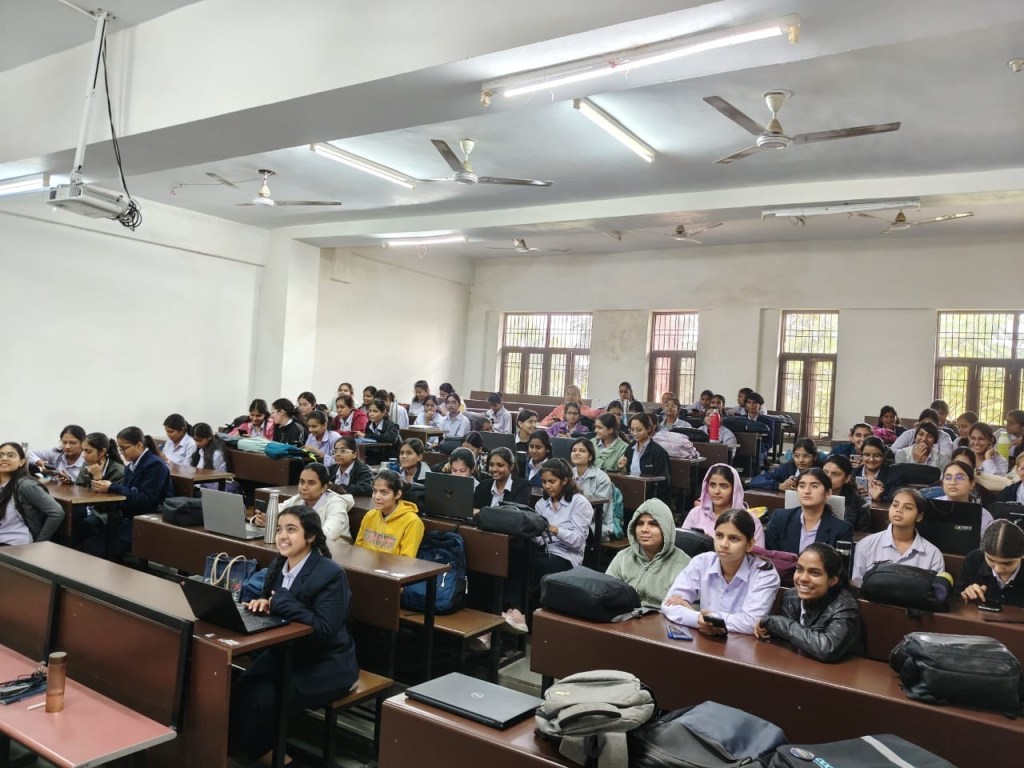
    One encouraging example came during the International Women’s Day celebration in Ajmer, India, where students participated alongside members of the local WordPress community. Organizers noted that the event included 100 female attendees, with around 50% of participants coming from student clubs. For many of those students, it was a first opportunity to take part in a broader community event, meet other contributors, and see how open source communities collaborate in practice.

    Women’s Day Ajmer 2026 Event, where more than 50% participation from student clubs

    Experiences like that show how student-led initiatives can extend beyond campus and begin contributing to the wider community. They also create space for new voices to participate. As students move from club sessions into local events, they gain experience not only as learners but also as community members who can help shape what comes next.

    The clubs are also creating leadership opportunities on campus. Organizers have stepped into new roles by coordinating activities, encouraging participation, and maintaining momentum over time. Those experiences help students build skills that matter both within the WordPress community and beyond it, including communication, organization, and problem-solving.

    “Being a Student Club Organizer helped me improve my leadership and communication skills.”
    — Sanjeevni Kumari, WordPress Student Club Organizer, Mahila Engineering College, Ajmer

    Looking Ahead

    WordPress Student Clubs are still developing, but the journey so far points to a promising direction. What began as an effort to sustain interest after WordPress Campus Connect is gradually becoming a more durable model for ongoing learning and collaboration on campus. The clubs are helping students stay connected to WordPress beyond a first introduction, while also creating stronger links between educational spaces and local communities.

    That longer-term potential is one reason this work matters. With regular campus activity and continued mentorship, Student Clubs can help create a stronger foundation for future contributors. They can also help students build confidence before attending local meetups, contributing to community efforts, or participating in events beyond their campuses.

    “With regular on-campus activities through WordPress Student Clubs, the real impact may become visible over the next couple of years, as a stronger WordPress ecosystem begins to take shape within campuses.”
    — Anand Upadhyay, Student Club Mentor

    As more students get involved and take ownership of these spaces, WordPress Student Clubs can continue to open pathways to learning, leadership, and community participation. For campuses, they offer a way to keep the momentum going after Campus Connect. For the broader project, they represent another step towards welcoming more students into the WordPress open source ecosystem. To follow this work and explore how it connects with the wider community, readers can look to WordPress Campus Connect, WordPress Meetups, and other education and community initiatives across WordPress.org.

    Note: Much of the credit belongs to @webtechpooja (Pooja Derashri) for help in writing this piece.

    Go to Original Source

  • WordPress Student Clubs Build Momentum

    WordPress Student Clubs Build Momentum

    WordPress Student Clubs are beginning to take shape as a new way to carry the momentum of WordPress Campus Connect beyond one-time workshops. What starts as an introduction to WordPress and open source is now continuing on campus through student-led groups that create space for learning, peer support, and early community participation. That shift matters because it gives students a more consistent path into the WordPress ecosystem while helping local communities build stronger connections with the next generation of contributors.

    Students showcasing a website they built during a club session

    When WordPress Campus Connect workshops first began reaching universities, the goal was straightforward: help students discover WordPress, understand the value of open source, and see that contribution can be part of their learning journey. In many cases, that first introduction created immediate interest. Students who had never worked with WordPress before started asking questions, exploring what the software could do, and showing curiosity about the wider community.

    That early response also revealed a gap. A workshop could spark interest, but it could not always sustain it on its own. Encouraging students to attend local WordPress meetups helped extend that first connection and, in some cases, brought new energy to existing local communities. Even so, it became clear that campuses needed something more consistent and closer to students’ everyday environment.

    WordPress Student Clubs emerged from that need. Instead of limiting engagement to a single event, these clubs create an ongoing, student-led presence on campus where students can keep learning, share knowledge with peers, and grow more confident over time. They also offer a practical bridge between first exposure and deeper participation, helping students move from curiosity to contribution through regular activity and community support.

    Learning What Sustains Participation

    As WordPress Student Clubs started forming across campuses, the early enthusiasm was encouraging, but sustaining that momentum proved to be one of the first real challenges. Student Club Organizers shared that interest was often strongest at the beginning, especially after a workshop or an introductory session, but turning that interest into regular participation required patience and experimentation. Like many community efforts, the clubs needed time to find a rhythm that worked for the students involved.

    One of the most common challenges was consistency. Many students were interested in learning WordPress, but regular engagement depended on more than initial curiosity. Organizers found that participation grew more steadily when activities felt approachable and useful, especially when students could learn by doing rather than only listening. Small learning sessions, collaborative exercises, and hands-on activities often made it easier for students to return and take part again.

    Organizers also noticed that some students were initially hesitant to engage actively. Asking questions, speaking up in a group, or volunteering to help lead a session did not always happen naturally. Building a club meant creating an environment where students felt comfortable enough to participate, try something new, and gradually take ownership of their own learning.

    Academic schedules added another layer of complexity. Because the clubs are student-led, planning around classes, assignments, and exams required flexibility. Keeping activities regular without overwhelming organizers or participants meant working within the rhythms of campus life. Those early difficulties became part of the learning process and helped shape how the clubs began to operate more effectively.

    Building Through Small, Consistent Activities

    As organizers worked through those challenges, certain approaches began to show results. Instead of focusing on large events, many clubs found momentum through simple, repeatable activities that students could join without feeling intimidated. Regular learning sessions, small hands-on workshops, and peer-to-peer discussions helped create an environment that felt both welcoming and practical.

    A Student club activity in a college led by a student club Organizer
    Students showcasing websites built during a club session

    That steady approach mattered. When students could return to familiar formats and see progress from one session to the next, clubs became easier to sustain. Organizers were able to build routines, and participants could join at their own pace. Over time, those small efforts started to strengthen participation more effectively than occasional large events.

    Student ownership also played an important role. As students began sharing what they had learned, helping their peers, and taking part in running sessions, engagement started to grow more organically. These moments helped shift the clubs from being simply learning spaces to becoming communities in their own right. Students were not only using WordPress in a classroom context. They were also beginning to understand it as part of a collaborative open source project shaped by people who learn together, build together, and support one another.

    Guidance from the local WordPress community helped reinforce that progress. Although the clubs are student-led, organizers benefited from having experienced community members available as mentors. Mentors helped them think through session structure, activity planning, and the practical challenge of staying motivated while balancing academic responsibilities. That kind of support gave organizers more confidence to experiment and keep building.

    Mentorship also connected campus activity to the broader WordPress ecosystem. Students were not learning in isolation. Through local community guidance, they were able to see how meetups, contributions, and collaboration all fit into a larger network of people who have been participating in WordPress for years. That connection gave the work happening on campus greater meaning and helped students see a clearer path forward.

    Early Impact Across Campuses

    Although WordPress Student Clubs are still in an early stage, signs of impact are already visible. Organizers have shared that more students are showing interest in learning WordPress and in exploring what open source participation can look like in practice. In several cases, students who first joined as learners are now contributing to discussions, helping peers during sessions, and organizing club activities themselves.

    That shift from passive participation to active involvement is one of the clearest signs of growth. It suggests that the clubs are beginning to create more than awareness. They are creating opportunities for students to build confidence, practice leadership, and develop a stronger sense of connection to the WordPress community. Even at this stage, that kind of change points to the long-term value of sustaining engagement on campus.

    One encouraging example came during the International Women’s Day celebration in Ajmer, India, where students participated alongside members of the local WordPress community. Organizers noted that the event included 100 female attendees, with around 50% of participants coming from student clubs. For many of those students, it was a first opportunity to take part in a broader community event, meet other contributors, and see how open source communities collaborate in practice.

    Women’s Day Ajmer 2026 Event, where more than 50% participation from student clubs

    Experiences like that show how student-led initiatives can extend beyond campus and begin contributing to the wider community. They also create space for new voices to participate. As students move from club sessions into local events, they gain experience not only as learners but also as community members who can help shape what comes next.

    The clubs are also creating leadership opportunities on campus. Organizers have stepped into new roles by coordinating activities, encouraging participation, and maintaining momentum over time. Those experiences help students build skills that matter both within the WordPress community and beyond it, including communication, organization, and problem-solving.

    “Being a Student Club Organizer helped me improve my leadership and communication skills.”
    — Sanjeevni Kumari, WordPress Student Club Organizer, Mahila Engineering College, Ajmer

    Looking Ahead

    WordPress Student Clubs are still developing, but the journey so far points to a promising direction. What began as an effort to sustain interest after WordPress Campus Connect is gradually becoming a more durable model for ongoing learning and collaboration on campus. The clubs are helping students stay connected to WordPress beyond a first introduction, while also creating stronger links between educational spaces and local communities.

    That longer-term potential is one reason this work matters. With regular campus activity and continued mentorship, Student Clubs can help create a stronger foundation for future contributors. They can also help students build confidence before attending local meetups, contributing to community efforts, or participating in events beyond their campuses.

    “With regular on-campus activities through WordPress Student Clubs, the real impact may become visible over the next couple of years, as a stronger WordPress ecosystem begins to take shape within campuses.”
    — Anand Upadhyay, Student Club Mentor

    As more students get involved and take ownership of these spaces, WordPress Student Clubs can continue to open pathways to learning, leadership, and community participation. For campuses, they offer a way to keep the momentum going after Campus Connect. For the broader project, they represent another step toward welcoming more students into the WordPress open source ecosystem. To follow this work and explore how it connects with the wider community, readers can look to WordPress Campus Connect, WordPress Meetups, and other education and community initiatives across WordPress.org.

    Note: Much of the credit belongs to @webtechpooja (Pooja Derashri) for help in writing this piece.

    Orijinal Kaynağa Git

  • Get Involved With WordCamp US 2026 in Phoenix

    Get Involved With WordCamp US 2026 in Phoenix

    WordCamp US 2026 will take place August 16–19 in Phoenix, Arizona, and applications are now open for sponsors, speakers, and volunteers. WordCamp US is the flagship gathering for the WordPress community in North America, where contributors, builders, and users come together to share ideas and help shape what comes next for the open web. Full details are available on the WordCamp US 2026 site.

    Sponsor

    Sponsorships keep WordCamp US accessible. They fund the production and programming that make a flagship WordCamp possible while keeping ticket prices low for attendees, and, in return, sponsors gain direct visibility within one of the most engaged technology ecosystems. Packages support both in-person and digital participation, with opportunities to connect with agencies, developers, and enterprise teams that build on WordPress every day.

    Speak

    The organizing team is looking for strong ideas with practical takeaways from across the community, whether that means a personal story, a lesson learned in production, or a perspective on where publishing, AI, and the open web are heading. Sessions can take the form of traditional talks, workshops, or more interactive formats, and new or underrepresented voices are especially encouraged to apply. Prior speaking experience is not required.

    Speaker applications due by May 29, 2026.

    Volunteer

    Volunteers are essential to the experience of the event. They welcome attendees and support sessions throughout the week, helping create the inclusive environment that defines a flagship WordCamp. Volunteering is also one of the best ways to meet people from across the global community and see firsthand how an event of this scale comes together. No prior experience is needed, and volunteers receive a free ticket.

    Volunteer applications due by June 15, 2026.

    Attend

    It’s the people. It’s the friendships and the stories.

    Matt Mullenweg, WordPress Cofounder

    WordCamp US continues a long tradition of in-person gatherings where contributors meet face-to-face to openly discuss the project’s direction. Whether you participate as a sponsor, take the stage, join the volunteer team, or help organize the event, your involvement shapes what the event becomes.

    To stay informed as ticket sales open and the schedule takes shape, subscribe to WordCamp US 2026 updates.

    Orijinal Kaynağa Git

  • WordPress 7.0 version candidate 3

    La troisième version candidate (« RC3 ») pour WordPress 7.0 est prête à être téléchargée et testée !

    Cette version du logiciel WordPress est en cours de développement. Veuillez ne pas installer, exécuter ou tester cette version de WordPress sur des sites Web de production ou critiques. Au lieu de cela, il est recommandé d’évaluer RC3 sur un serveur et un site de test.

    Atteindre cette phase du cycle de publication est une étape importante. Comme toujours, les tests restent cruciaux pour garantir que tout dans WordPress 7.0 est le meilleur possible.

    Vous pouvez tester WordPress 7.0 RC3 de quatre manières :

    Plugin Installez et activez le plugin WordPress Beta Tester sur une installation WordPress. (Sélectionnez le canal « Bleeding Edge » et le flux « Bêta/RC uniquement ».)
    Téléchargement direct Téléchargez la version RC3 (zip) et installez-la sur un site Web WordPress.
    Commande Ligne Utilisez cette commande WP-CLI :
    wp core update --version=7.0-RC3
    WordPress Playground Utilisez le Instance WordPress Playground pour tester le logiciel directement dans votre navigateur.  Aucune configuration n’est requise – il suffit de cliquer et c’est parti ! 

    La date de sortie finale prévue pour WordPress 7.0 est le 20 mai 2026. Le le calendrier de sortie complet peut être trouvé ici. Votre aide pour tester les versions bêta et RC est essentielle pour rendre cette version aussi stable et puissante que possible. Merci à tous ceux qui aident aux tests !

    Veuillez continuer à consulter le blog Make WordPress Core pour les articles liés à la version 7.0 dans les semaines à venir pour plus d’informations.

    Qu’y a-t-il dans WordPress 7.0 RC3 ?

    Vous souhaitez approfondir les détails et les notes techniques de cette version ? Jetez un œil aux Notes du développeur WordPress 7.0. Pour obtenir des informations techniques relatives aux plus de 143 problèmes résolus depuis le RC2, vous pouvez parcourir les liens suivants :

    Remarque : La collaboration en temps réel ne sera pas incluse dans la version 7.0 et sera réévaluée au cours du cycle de publication de la version 7.1. Pour cette raison, cette version RC3 n’est plus considérée comme une « nouvelle Bêta 1 ».

    Comment contribuer

    WordPress est un logiciel open source rendu possible par une communauté passionnée de personnes collaborant et contribuant à son développement. Les ressources ci-dessous décrivent différentes manières de vous impliquer dans la plateforme Web open source la plus populaire au monde, quelle que soit votre expertise technique.

    Impliquez-vous dans les tests

    Les tests de problèmes sont essentiels au développement de tout logiciel. C’est aussi une manière significative pour quiconque de contribuer. Votre aide pour tester la version WordPress 7.0 RC3 est essentielle pour garantir que la version finale est la meilleure possible.

    Ce guide détaillé vous guidera à travers les tests des fonctionnalités de WordPress 7.0. 

    Pour ceux qui débutent dans les tests, suivez ce guide de test général pour plus de détails sur la configuration.

    Si vous rencontrez un bug ou un problème potentiel, veuillez le signaler à la zone Alpha/Beta des forums d’assistance ou directement à WordPress Trac si vous êtes à l’aise pour rédiger un rapport de bug reproductible. Vous pouvez également vérifier votre problème par rapport à une liste de bogues connus

    Vous êtes curieux de tester les versions en général ?  Suivez les initiatives de test dans Make Core et rejoignez la chaîne #core-test sur Making WordPress Slack.

    Mettez à jour votre thème ou plugin

    Pour les auteurs de plugins et de thèmes, vos produits jouent un rôle essentiel dans l’extension des fonctionnalités et de la valeur de WordPress pour tous les utilisateurs.

    Merci de continuer à tester vos thèmes et plugins avec les versions bêta de WordPress 7.0. Si vous ne l’avez pas encore fait, assurez-vous de terminer vos tests et de mettre à jour la version « Testé jusqu’à » dans votre fichier Lisez-moi du plugin vers la version 7.0.

    Si vous rencontrez des problèmes de compatibilité, veuillez publier des informations détaillées sur le forum d’assistance.

    Testez sur vos plateformes d’hébergement

    Les hébergeurs Web fournissent une infrastructure vitale pour prendre en charge WordPress et ses utilisateurs. Les tests sur les systèmes d’hébergement contribuent à éclairer le processus de développement tout en garantissant que WordPress et les plates-formes d’hébergement sont entièrement compatibles, exempts d’erreurs, optimisés pour la meilleure expérience utilisateur possible et que les mises à jour sont déployées sur les sites clients sans problème.

    Merci aux hôtes qui ont aidé à tester les variantes de la nouvelle architecture RTC : Kinsta, Bluehost, GoDaddy, WordPress.com, XServer et Ionos, et aux les hôtes qui participent régulièrement aux tests distribués.

    Vous souhaitez tester WordPress sur votre système d’hébergement ? Commencez par configurer les tests d’hébergement distribué ici.

    Aide à traduire WordPress

    Parlez-vous une langue autre que l’anglais ? ¿Espagnol? Français ? Russe? C’est quoi ? Qu’est-ce que c’est? Qu’est-ce que c’est? Alors? Qu’est-ce que c’est?  Vous pouvez aider à traduire WordPress dans plus de 100 langues. Cette étape de version (RC3) marque le gel définitif des chaînes du cycle de publication 7.0.

    Un haïku RC3

    Au gré des marées de la mer,
    où le vent se déplace doucement à travers les arbres,
    surgit du RC3.

    Accessoires pour @desrosj, @peterwilsoncc pour la relecture et la révision.

    Aller à la source originale

  • WordPress 7.0 Release Candidate 3

    Der dritte Release Candidate („RC3“) für WordPress 7.0 steht zum Herunterladen und Testen bereit!

    Diese Version der WordPress-Software befindet sich in der Entwicklung. Bitte installieren, führen oder testen Sie diese Version von WordPress nicht auf Produktions- oder geschäftskritischen Websites. Stattdessen wird empfohlen, RC3 auf einem Testserver und einer Testseite zu testen.

    Das Erreichen dieser Phase des Release-Zyklus ist ein wichtiger Meilenstein. Wie immer bleiben Tests von entscheidender Bedeutung, um sicherzustellen, dass alles in WordPress 7.0 das Beste ist, was es sein kann.

    Sie können WordPress 7.0 RC3 auf vier Arten testen:

    Plugin Installieren und aktivieren Sie das WordPress Beta Tester-Plugin in einer WordPress-Installation. (Wählen Sie den Kanal „Bleeding Edge“ und den Stream „Nur Beta/RC“.)
    Direkter Download Laden Sie die RC3-Version (zip) herunter und installieren Sie sie auf einer WordPress-Website.
    Befehl Zeile Verwenden Sie diesen WP-CLI-Befehl:
    wp core update --version=7.0-RC3
    WordPress Playground Verwenden Sie den WordPress Playground-Instanz, um die Software direkt in Ihrem Browser zu testen.  Es ist keine Einrichtung erforderlich – einfach klicken und loslegen! 

    Der geplante endgültige Veröffentlichungstermin für WordPress 7.0 ist der 20. Mai 2026. Den vollständigen Veröffentlichungsplan finden Sie hier. Ihre Hilfe beim Testen der Beta- und RC-Versionen ist von entscheidender Bedeutung, um diese Version so stabil und leistungsstark wie möglich zu machen. Vielen Dank an alle, die beim Testen helfen!

    Bitte lesen Sie in den kommenden Wochen weiterhin den Make WordPress Core-Blog für 7.0-bezogene Beiträge, um weitere Informationen zu erhalten.

    Was ist in WordPress 7.0 RC3?

    Möchten Sie sich die Details und technischen Hinweise zu dieser Version genauer ansehen? Schauen Sie sich die Entwicklerhinweise zu WordPress 7.0 an. Technische Informationen zu den über 143 Problemen, die seit RC2 behoben wurden, finden Sie unter den folgenden Links:

    Hinweis: Real Time Collaboration wird nicht in der 7.0-Version enthalten sein und wird während des 7.1-Release-Zyklus neu evaluiert. Aus diesem Grund gilt diese RC3-Version nicht mehr als „neue Beta 1“.

    Wie Sie dazu beitragen können

    WordPress ist eine Open-Source-Software, die durch eine leidenschaftliche Community von Menschen ermöglicht wird, die an ihrer Entwicklung zusammenarbeiten und dazu beitragen. Die folgenden Ressourcen beschreiben verschiedene Möglichkeiten, wie Sie sich unabhängig von Ihrem technischen Fachwissen an der weltweit beliebtesten Open-Source-Webplattform beteiligen können.

    Beteiligen Sie sich am Testen

    Das Testen auf Probleme ist für die Entwicklung jeder Software von entscheidender Bedeutung. Es ist auch eine sinnvolle Möglichkeit für jeden, einen Beitrag zu leisten. Ihre Hilfe beim Testen der WordPress 7.0 RC3-Version ist der Schlüssel dazu, sicherzustellen, dass die endgültige Version das Beste ist, was sie sein kann.

    Diese detaillierte Anleitung führt Sie durch die Testfunktionen in WordPress 7.0. 

    Für diejenigen, die neu im Testen sind, folgen Sie diesem allgemeinen Testleitfaden für weitere Details zur Einrichtung.

    Wenn Sie auf einen potenziellen Fehler oder ein Problem stoßen, melden Sie es bitte im Alpha/Beta-Bereich der Support-Foren oder direkt an WordPress Trac, wenn Sie mit dem Schreiben eines reproduzierbaren Fehlerberichts vertraut sind. Sie können Ihr Problem auch anhand einer Liste bekannter Fehler überprüfen. 

    Neugierig auf das Testen von Releases im Allgemeinen?  Folgen Sie den Testinitiativen in Make Core und treten Sie dem #core-test-Kanal auf Making WordPress Slack bei.

    Aktualisieren Sie Ihr Theme oder Plugin

    Für Plugin- und Theme-Autoren spielen Ihre Produkte eine wesentliche Rolle bei der Erweiterung der Funktionalität und des Werts von WordPress für alle Benutzer.

    Vielen Dank, dass Sie Ihre Themes und Plugins weiterhin mit den Betaversionen von WordPress 7.0 testen. Wenn Sie dies noch nicht getan haben, schließen Sie unbedingt Ihre Tests ab und aktualisieren Sie die Version „Getestet bis“ in der Readme-Datei Ihres Plugins auf 7.0.

    Wenn Sie Kompatibilitätsprobleme feststellen, posten Sie bitte detaillierte Informationen im Supportforum.

    Testen Sie auf Ihren Hosting-Plattformen

    Webhosts stellen eine wichtige Infrastruktur für die Unterstützung von WordPress und seinen Benutzern bereit. Tests auf Hosting-Systemen unterstützen den Entwicklungsprozess und stellen gleichzeitig sicher, dass WordPress und Hosting-Plattformen vollständig kompatibel, fehlerfrei und für die bestmögliche Benutzererfahrung optimiert sind und dass Updates problemlos auf Kundenseiten bereitgestellt werden.

    Vielen Dank an die Hosts, die beim Testen von Variationen der neuen RTC-Architektur geholfen haben: Kinsta, Bluehost, GoDaddy, WordPress.com, XServer und Ionos, und an die Hosts, die regelmäßig an verteilten Tests teilnehmen.

    Möchten Sie WordPress auf Ihrem Hosting-System testen? Beginnen Sie hier mit der Konfiguration verteilter Hosting-Tests.

    Helfen Sie beim Übersetzen von WordPress

    Sprechen Sie eine andere Sprache als Englisch? ¿Español? Französisch? Russisch? 日本語? Was ist das? Was ist das? Warum? Was ist das?  Sie können bei der Übersetzung von WordPress in mehr als 100 Sprachen helfen. Dieser Release-Meilenstein (RC3) markiert den harten String-Freeze-Punkt des 7.0-Release-Zyklus.

    Ein RC3-Haiku

    Bei den Gezeiten des Meeres,
    wo der Wind sanft durch Bäume weht,
    entsteht RC3.

    Props an @desrosj, @peterwilsoncc zum Korrekturlesen und Überprüfen.

    Zur Originalquelle gehen

  • WordPress 7.0 Release Candidate 3

    The third Release Candidate (“RC3”) for WordPress 7.0 is ready for download and testing!

    This version of the WordPress software is under development. Please do not install, run, or test this version of WordPress on production or mission-critical websites. Instead, it’s recommended that you evaluate RC3 on a test server and site.

    Reaching this phase of the release cycle is an important milestone. As always, testing remains crucial to ensure that everything in WordPress 7.0 is the best it can be.

    You can test WordPress 7.0 RC3 in four ways:

    Plugin Install and activate the WordPress Beta Tester plugin on a WordPress install. (Select the “Bleeding edge” channel and “Beta/RC Only” stream.)
    Direct Download Download the RC3 version (zip) and install it on a WordPress website.
    Command Line Use this WP-CLI command:
    wp core update --version=7.0-RC3
    WordPress Playground Use the WordPress Playground instance to test the software directly in your browser.  No setup is required – just click and go! 

    The scheduled final release date for WordPress 7.0 is May 20, 2026. The full release schedule can be found here. Your help testing Beta and RC versions is vital to making this release as stable and powerful as possible. Thank you to everyone who helps with testing!

    Please continue checking the Make WordPress Core blog for 7.0-related posts in the coming weeks for more information.

    What’s in WordPress 7.0 RC3?

    Want to look deeper into the details and technical notes for this release? Take a look at the WordPress 7.0 Developer Notes. For technical information related to the 143+ issues addressed since RC2, you can browse the following links:

    Note: Real Time Collaboration will not be included in the 7.0 release and will be re-evaluated during the 7.1 release cycle. Because of this, this RC3 version is no longer considered a “new Beta 1”.

    How you can contribute

    WordPress is open source software made possible by a passionate community of people collaborating on and contributing to its development. The resources below outline various ways you can get involved with the world’s most popular open source web platform, regardless of your technical expertise.

    Get involved in testing

    Testing for issues is crucial to the development of any software. It’s also a meaningful way for anyone to contribute. Your help testing the WordPress 7.0 RC3 version is key to ensuring that the final release is the best it can be.

    This detailed guide will walk you through testing features in WordPress 7.0. 

    For those new to testing, follow this general testing guide for more details on getting set up.

    If you encounter a potential bug or issue, please report it to the Alpha/Beta area of the support forums or directly to WordPress Trac if you are comfortable writing a reproducible bug report. You can also check your issue against a list of known bugs

    Curious about testing releases in general?  Follow along with the testing initiatives in Make Core and join the #core-test channel on Making WordPress Slack.

    Update your theme or plugin

    For plugin and theme authors, your products play an integral role in extending the functionality and value of WordPress for all users.

    Thanks for continuing to test your themes and plugins with the WordPress 7.0 beta releases. If you haven’t yet, make sure to conclude your testing and update the “Tested up to” version in your plugin’s readme file to 7.0.

    If you find compatibility issues, please post detailed information to the support forum.

    Test on your hosting platforms

    Web hosts provide vital infrastructure for supporting WordPress and its users. Testing on hosting systems helps inform the development process while ensuring that WordPress and hosting platforms are fully compatible, free of errors, optimized for the best possible user experience, and that updates roll out to customer sites without issue.

    Thank you to the Hosts who helped test variations of new RTC architecture: Kinsta, Bluehost, GoDaddy, WordPress.com, XServer, and Ionos, and to the hosts who participate in distributed testing regularly.

    Want to test WordPress on your hosting system? Get started with configuring distributed hosting tests here.

    Help translate WordPress

    Do you speak a language other than English? ¿Español? Français? Русский? 日本語? What is it? What is it? मराठी? What is it?  You can help translate WordPress into more than 100 languages. This release milestone (RC3) marks the hard string freeze point of the 7.0 release cycle.

    An RC3 haiku

    By the tides of sea,
    where wind moves gently through trees,
    sprouts up RC3.

    Props to @desrosj, @peterwilsoncc for proofreading and review.

    Go to Original Source

  • WordPress 7.0 Release Candidate 3

    The third Release Candidate (“RC3”) for WordPress 7.0 is ready for download and testing!

    This version of the WordPress software is under development. Please do not install, run, or test this version of WordPress on production or mission-critical websites. Instead, it’s recommended that you evaluate RC3 on a test server and site.

    Reaching this phase of the release cycle is an important milestone. As always, testing remains crucial to ensure that everything in WordPress 7.0 is the best it can be.

    You can test WordPress 7.0 RC3 in four ways:

    Plugin Install and activate the WordPress Beta Tester plugin on a WordPress install. (Select the “Bleeding edge” channel and “Beta/RC Only” stream.)
    Direct Download Download the RC3 version (zip) and install it on a WordPress website.
    Command Line Use this WP-CLI command:
    wp core update --version=7.0-RC3
    WordPress Playground Use the WordPress Playground instance to test the software directly in your browser.  No setup is required – just click and go! 

    The scheduled final release date for WordPress 7.0 is May 20, 2026. The full release schedule can be found here. Your help testing Beta and RC versions is vital to making this release as stable and powerful as possible. Thank you to everyone who helps with testing!

    Please continue checking the Make WordPress Core blog for 7.0-related posts in the coming weeks for more information.

    What’s in WordPress 7.0 RC3?

    Want to look deeper into the details and technical notes for this release? Take a look at the WordPress 7.0 Developer Notes. For technical information related to the 143+ issues addressed since RC2, you can browse the following links:

    Note: Real Time Collaboration will not be included in the 7.0 release and will be re-evaluated during the 7.1 release cycle. Because of this, this RC3 version is no longer considered a “new Beta 1”.

    How you can contribute

    WordPress is open source software made possible by a passionate community of people collaborating on and contributing to its development. The resources below outline various ways you can get involved with the world’s most popular open source web platform, regardless of your technical expertise.

    Get involved in testing

    Testing for issues is crucial to the development of any software. It’s also a meaningful way for anyone to contribute. Your help testing the WordPress 7.0 RC3 version is key to ensuring that the final release is the best it can be.

    This detailed guide will walk you through testing features in WordPress 7.0. 

    For those new to testing, follow this general testing guide for more details on getting set up.

    If you encounter a potential bug or issue, please report it to the Alpha/Beta area of the support forums or directly to WordPress Trac if you are comfortable writing a reproducible bug report. You can also check your issue against a list of known bugs

    Curious about testing releases in general?  Follow along with the testing initiatives in Make Core and join the #core-test channel on Making WordPress Slack.

    Update your theme or plugin

    For plugin and theme authors, your products play an integral role in extending the functionality and value of WordPress for all users.

    Thanks for continuing to test your themes and plugins with the WordPress 7.0 beta releases. If you haven’t yet, make sure to conclude your testing and update the “Tested up to” version in your plugin’s readme file to 7.0.

    If you find compatibility issues, please post detailed information to the support forum.

    Test on your hosting platforms

    Web hosts provide vital infrastructure for supporting WordPress and its users. Testing on hosting systems helps inform the development process while ensuring that WordPress and hosting platforms are fully compatible, free of errors, optimized for the best possible user experience, and that updates roll out to customer sites without issue.

    Thank you to the Hosts who helped test variations of new RTC architecture: Kinsta, Bluehost, GoDaddy, WordPress.com, XServer, and Ionos, and to the hosts who participate in distributed testing regularly.

    Want to test WordPress on your hosting system? Get started with configuring distributed hosting tests here.

    Help translate WordPress

    Do you speak a language other than English? ¿Español? Français? Русский? 日本語? हिन्दी? বাংলা? मराठी? ಕನ್ನಡ?  You can help translate WordPress into more than 100 languages. This release milestone (RC3) marks the hard string freeze point of the 7.0 release cycle.

    An RC3 haiku

    By the tides of sea,
    where wind moves gently through trees,
    sprouts up RC3.

    Props to @desrosj, @peterwilsoncc for proofreading and review.

    Orijinal Kaynağa Git

  • Obtenez vos billets pour le WordCamp US 2026

    Obtenez vos billets pour le WordCamp US 2026

    16-19 août 2026, Phoenix Convention Center – Phoenix, Arizona

    Les billets sont désormais disponibles pour le WordCamp US 2026, qui aura lieu du 16 au 19 août 2026 au Phoenix Convention Center à Phoenix, en Arizona. L’événement phare rassemble des personnes de toute la communauté WordPress pour apprendre, contribuer, partager des idées, se connecter avec des équipes de contributeurs et contribuer à façonner l’avenir d’un projet open source qui alimente plus de 40 % du Web.

    🎟 Les billets sont limitée. Sécurisez le vôtre dès aujourd’hui !

    WordCamp US est conçu pour les personnes se trouvant à de nombreux stades de leur parcours WordPress, notamment les contributeurs, les développeurs, les concepteurs, les spécialistes du marketing, les éditeurs, les propriétaires d’entreprise, les enseignants, les étudiants et toute personne souhaitant en savoir plus sur WordPress. L’événement de cette année comprendra la Journée des contributeurs, où les participants pourront travailler aux côtés des équipes de contributeurs et apprendre comment participer au projet ; Showcase Day, qui met en lumière les utilisations réelles de WordPress ; et deux journées complètes de sessions et d’ateliers. La programmation explorera également comment l’intelligence artificielle change la façon dont les gens créent, publient, construisent et maintiennent des expériences numériques, WordPress étant une partie importante de cette conversation plus large.

    Rassemblez-vous à Phoenix

    Cette année, le WordCamp US se déroulera également au centre-ville de Phoenix, où le Phoenix Convention Center se trouve à proximité des restaurants, des musées, des théâtres, des galeries, des concerts et du Quartier des arts de Roosevelt Row. Les participants peuvent rester à proximité du lieu, rencontrer d’autres membres de la communauté entre les sessions et explorer un centre-ville desservi par le Valley Metro Rail. Pour ceux qui prolongent leur voyage, Phoenix offre également un accès à la région plus vaste du désert de Sonora, notamment aux parcs, jardins et espaces extérieurs qui font de la ville un cadre distinct pour l’événement de cette année.

    Choisissez le billet qui vous convient

    Plusieurs options de billets sont disponibles, offrant aux participants différentes façons de rejoindre ou de soutenir l’événement :

    • Admission générale : un billet de 100 $ qui comprend l’accès aux quatre jours de programmation du WordCamp US, y compris la Journée des contributeurs, la Journée vitrine, les sessions, les ateliers, les déjeuners et les collations, les stands des sponsors et la communauté sociale.
    • Étudiant : un billet de 25 $ pour les étudiants qui souhaitent en savoir plus sur WordPress, entrer en contact avec des mentors et des membres de la communauté, explorer la contribution open source et acquérir une expérience pratique.
    • Micro-Sponsor : un billet de 750 $ qui comprend les mêmes avantages d’accès et de participation que l’admission générale, tout en aidant à couvrir le coût réel de l’événement. Les micro-sponsors seront également répertoriés sur la page officielle des sponsors du WordCamp US.

    Les détails complets du billet, y compris les informations de remboursement, l’assistance relative aux visas, les aménagements alimentaires, les conditions d’inscription et d’autres informations sur les participants, sont disponibles sur la page du billet. Vous pouvez également suivre le site Web WordCamp US 2026 pour obtenir des mises à jour sur le programme, les conférenciers, les informations de voyage et bien plus encore à mesure que l’événement se rapproche.

    Aller à la source originale